Google Mobile — Web Search
Want to get Google Web Search results on your phone or mobile device? Here's how.
Tip: You can get help using Google Mobile Search on your phone or mobile device at any time by selecting the "Help" link located under the search box or in your search menu options.
|
Use Google Web Search on your phone or mobile device to search through 8 billion pages. While on the go, use the Web to find ingredients for a recipe, answer a trivia question to prove that you're right or find facts on your favorite sports team.
- Access the mobile Web browser on your phone or mobile device.
- Type www.google.com in the URL field (if you get an error message, type www.google.com/xhtml).
- Type your search query.
- Highlight the "Google Search" button and press "Enter."
- Ten search results will appear per page.
- Select the desired link by scrolling through the results page
- Or scroll down to the bottom of the page, select the "Next" link to view the next ten results
- Once you have selected a link Google will reformat the selected webpage to fit your phone screen.
|
Local Search Results |
| |
Google Local enables you to search for stores and businesses in a specific area. To get Google Local results, simply type in the business name and include a zip code or city and state in the search query. Your top 3 results will be Local results, followed by 10 ordinary Web results. If you click on any of the Local results, you can get maps and directions.
You can also get maps, driving directions and a full list of local results by selecting "Local" in the search options or going directly to http://mobile.google.com/local on your phone. Learn more.
| Examples: |
- mcdonalds 94043
- barbeque kansas city ks
|
|
Definitions |
| |
To
see a definition for a word or phrase, simply type the word "define,"
then a space, and then the word(s) you want defined. If Google has seen
a definition for that word or phrase anywhere on the Web, we'll display
that information at the top of your results.
| Examples: |
- define camera
- define [phrase?]
|
|
Spell Checker |
| |
Google checks whether your query is the most common version of a word's spelling. If we think a different spelling is likely to generate more relevant search results, we'll ask "Did you mean: (more common spelling)?" Clicking on the suggested spelling launches a Google search for that term. (Note: Google spell check works for proper nouns (names and places) that might not appear in standard spell-check programs or dictionary.
| Examples: |
- 'pinapple' (Did you mean: 'pineapple')
- 'kitchan' (Did you mean: 'kitchen')
|
|
Movie Showtimes |
| |
To find showtimes for movies playing near you, type
"movies", "showtimes" or the name of a current film, followed by the location.
| Examples: |
- movies palo alto, ca
- charlie and the chocolate factory 94301
|
|
Weather |
| |
To see weather conditions and a four-day forecast for a particular
U.S. location, type "weather," followed by the location. A city name
usually will be enough, but you may also want to include a state or
zipcode.
| Examples: |
- weather palo alto, ca
- weather 94301
|
|
Stock Quotes |
| |
To get live stock quotes and information, simply enter a ticker
symbol. If we recognize the stock ticker you entered, we'll return the
latest stock price (with a 15-minute delay for NASDAQ or a 20-minute delay
for AMEX and NYSE) and other useful information.
When available, we'll also return quotes from an Electronic Communication
Network (ECN), a computerized trading system that reports quotes in real
time (Disclaimer). ECNs also allow trading after standard market hours and thus can be a good source for after-hours quotes.
Google's financial information providers are selected and ordered solely
on the basis of quality factors, including download speed, user interface
and functionality. Google is not affiliated with these providers in any way.
If you'd like to suggest a provider we might include, please contact us.
|
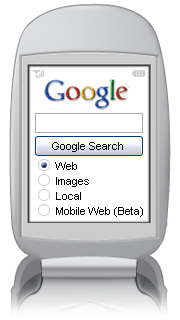
Even if you can't access www.google.com/xhtml on your phone's mobile web browser, we also offer www.google.com/wml which offers Web Search and Mobile search. Mobile search restricts your search to the mobile index which contains sites that are specifically written to fit your mobile screen.
- Access the mobile Web browser on your phone or mobile device.
- Type www.google.com in the URL field.
- Type your search query.
- Highlight the "Web" or "Mobile Web" button and press "Enter."
- Five search results will appear per page.
- Select the desired link by scrolling through the results page
- Or scroll down to the bottom of the page, select the "Next" link to view the next five results
- Once you have selected a link Google will reformat the selected webpage to fit your phone screen.
|
Spell Checker |
| |
Google checks whether your query is the most common version of a word's spelling. If we think a different spelling is likely to generate more relevant search results, we'll ask "Did you mean: (more common spelling)?" Clicking on the suggested spelling launches a Google search for that term. (Note: Google spell check works for proper nouns (names and places) that might not appear in standard spell-check programs or dictionary.
| Examples: |
- 'pinapple' (Did you mean: 'pineapple')
- 'kitchan' (Did you mean: 'kitchen')
|
|
Froogle Mobile Search |
| |
Search the web to compare product prices with Froogle. Froogle lets you search millions of products from stores across the web. Check prices on popular products for easy comparison shopping. These results are not advertisements, just current prices for products available online.
On your mobile device, you can access Froogle at http://wml.froogle.com/
Learn more at: http://labs.google.com/frooglewml.html |
| Do you still have more questions? |
| |
Get answers to your questions with our FAQ guide. |
Still want more? |
| |
Submit your email address to be one of the first to get updates on Google Mobile developments and to partake in future Google Mobile studies.
|
Here's how to get Google Mobile Search instructions and search tips on your phone or mobile device:
When using 'www.google.com/wml'...
...get help through the Search Options Menu
When using 'www.google.com/xhtml'...
...get search tips through the link under the search box.
If you have easy access to your computer and want to learn more about writing search queries...
...check out the Google Help Center.
|
![]() ![]() |
 |
|
|